By GEARITUP.ai Editorial Team * Last Updated: May 2026
This post contains affiliate links; we may earn a small commission, at no additional cost to you.

Overview
These are the two most-searched project management tools in 2026 — and together they serve over 300,000 paying organizations. But they have evolved in meaningfully different directions. One is a structured, task-centric platform where the goal is clarity, accountability, and powerful automation. The other is a visual, flexible Work OS where the goal is customization, speed of setup, and dashboards your whole team will actually look at.
Choosing the wrong one is a productivity tax your team pays every single day. Here is the honest breakdown.
What Each Tool Is Actually Built For
Asana is a structured project management platform built around its “Work Graph” — a proprietary data model that maps relationships between tasks, projects, milestones, goals, and people. It is opinionated: tasks have owners, deadlines have dependencies, and projects connect to organizational OKRs. The 2026 rollout of AI Studio and AI Teammates has made Asana the clear AI leader in the category. Unlimited automations on all paid plans and unlimited free guest access make it the default choice for teams managing complex workflows with external collaborators.
Monday.com is a visual Work OS built around flexible, color-coded boards that adapt to almost any team process. Its “monday 3.0” redesign (2025) brought 40% faster load times, a unified search experience, and a stronger dashboard layer. It is less opinionated than Asana — you can build your own workflow structure rather than conforming to one — which is either a strength or a weakness depending on your team. Monday.com is typically 18–52% cheaper at comparable paid tiers and has the most visually intuitive interface in the category.
The core tension: Asana asks you to work the way it was designed. Monday.com asks you to design the way you work. Both approaches produce great results for the right team.
Feature Score Comparison
Scores are research-based ratings drawn from G2 (22,000+ reviews), Capterra, TrustRadius, Reddit, and analyst comparisons. They represent consensus user experience across the market.
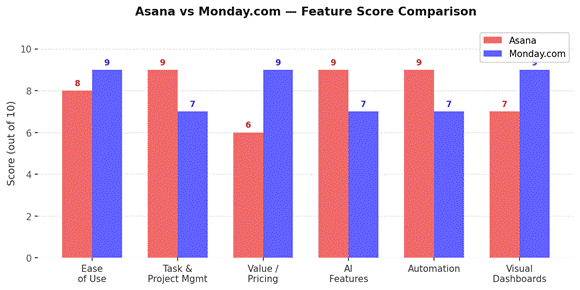
| Category | Asana | Monday.com | Winner | Research Score |
| Ease of Use | 8 / 10 | 9 / 10 | Monday.com | ★ Research-based |
| Task & Project Mgmt | 9 / 10 | 7 / 10 | Asana | ★ Research-based |
| Value / Pricing | 6 / 10 | 9 / 10 | Monday.com | ★ Research-based |
| AI Features | 9 / 10 | 7 / 10 | Asana | ★ Research-based |
| Automation | 9 / 10 | 7 / 10 | Asana | ★ Research-based |
| Visual Dashboards | 7 / 10 | 9 / 10 | Monday.com | ★ Research-based |
Pros & Cons at a Glance
| ✅ Asana Pros | ❌ Asana Cons | ✅ Monday.com Pros | ❌ Monday.com Cons |
| Unlimited automations on all paid plans | Pricier at mid tiers vs Monday.com | More affordable at Pro tier ($19 vs $24.99/seat) | Automation capped at 250 actions/mo on Standard |
| Best free plan in category (unlimited projects & guests) | List-first interface can feel less visual | Highly visual — best dashboards & color-coded boards | AI credits limited — heavy users burn through fast |
| Superior AI — AI Studio + AI Teammates (2026 standout) | Gantt/Timeline locked behind paid plans | Easiest onboarding (1–2 hours per G2 data) | Integrations locked behind higher tiers |
| Most powerful task hierarchy (tasks > subtasks > nested) | No native time tracking (needs integration) | 24/7 live support on all plans | Free plan very limited (3 boards only) |
| 400+ integrations — doesn’t count against automation quota | Mobile app rated slightly lower (4.5 stars) | Most flexible column & board customization | Task hierarchy less structured than Asana |
| OKR & goal tracking built in natively | Less flexible for non-standard workflows | FedRAMP authorized (early 2026) for regulated industries | Some AI features hosted outside main app (extra cost) |
Feature Breakdown
Ease of Use
Monday.com is the easier platform to start with — full stop. User surveys on G2 put the average Monday.com onboarding time at 1–2 hours. Its drag-and-drop boards, 200+ ready-made templates, and visual column system mean most teams are managing real projects within their first session. G2 reviewers consistently rate Monday.com higher for ease of setup and administration.
Asana is not difficult, but it has more structure — and with structure comes a learning curve. The list-first interface, task hierarchy, and dependency system take a little time to feel natural. The 2026 AI-first redesign has improved discoverability significantly, but Asana still assumes you want to be organized in its way. Teams that embrace that structure get tremendous value. Teams that resist it tend to drift toward Monday.com.
Winner: Monday.com — faster onboarding and a more visual-first experience.
Task & Project Management
Asana wins this one. Its Work Graph data model supports the most sophisticated task hierarchy in the category — tasks, subtasks, nested subtasks — and its dependency system is purpose-built for complex project planning. Timeline (Gantt) view integrates deeply with dependencies, so moving one task cascades intelligently across a project plan. Goal and OKR tracking is native, connecting daily work to company-level objectives in a way Monday.com cannot match out of the box.
Monday.com’s boards are excellent for tracking work but less structured for true project dependency management. The Timeline view is functional but feels more like a visualization of board data than an integrated planning tool. For teams managing simple-to-moderate project complexity, this is not a problem. For teams managing complex cross-functional projects with deep dependency chains, Asana’s structure is genuinely superior.
Winner: Asana — especially for complex, dependency-heavy project structures.
Value / Pricing
Monday.com is meaningfully cheaper at the mid tier — its Pro plan at $19/seat/month versus Asana’s Advanced plan at $24.99/user/month, a 31% price gap. For a 20-person team on annual billing, that is over $1,400 per year. Monday.com also sells seats in blocks, which can inflate costs for teams that do not fit neatly into their tier bands, but the base per-seat rate is consistently lower.
Asana’s free plan is objectively better: unlimited projects, unlimited free guests, and real task management — versus Monday.com’s three-board limit with no integrations. If you are evaluating both on a free tier before committing, Asana gives you a far more honest picture of what the paid product actually does.
Winner: Monday.com for paid plans. Asana for the free tier evaluation.
AI Features
This is the most significant shift in the category in 2026, and Asana is the clear winner. AI Studio — released in late 2024 and now available on Starter plans and above — lets teams build autonomous workflows in plain English. AI Teammates understand the full context of a project through the Work Graph: goals, dependencies, deadlines, and ownership. Every AI action is visible and auditable. Smart Status automatically summarizes project health. Unlimited AI usage on paid plans removes the credit anxiety that dogs Monday.com.
Monday.com’s AI Sidekick is useful for brainstorming and organizing, but it runs on a credit-based system that experienced users burn through quickly. Some of Monday.com’s most promising AI features (monday Vibe, at $100–$250/month) live outside the core app entirely. The AI roadmap is ambitious, but the current implementation is less integrated and less unlimited than Asana’s.
Winner: Asana — AI Studio is the most meaningful feature gap between the two platforms in 2026.
Automation
Asana wins on automation depth and generosity. All paid plans include unlimited automation rules — no action caps, no overage fees. Rules can trigger across multiple projects and apply to complex multi-step processes. Integrations with Slack, Salesforce, and GitHub do not count against automation quotas.
Monday.com’s Standard plan caps automations at 250 actions per month — easily exhausted by a single active Slack and CRM sync. Upgrading to Pro unlocks 25,000 monthly actions but adds cost. For automation-light teams this is not a problem. For teams building serious workflow automation, Asana’s unlimited approach is a meaningful operational advantage.
Winner: Asana — unlimited automations at every paid tier is a real differentiator.
Visual Dashboards
Monday.com owns this category. Its dashboard system provides a “Control Room” perspective — aggregating data across boards into visual widgets, charts, and KPI views that update in real time. The color-coded board aesthetic is the most immediately appealing in the category, and the 40% performance improvement in the monday 3.0 update makes those dashboards genuinely fast to load and interact with.
Asana’s Universal Reporting is strong for cross-team workload management and OKR tracking, but it is less visual and more analytical. The reports are useful for project managers and team leads; they are not the kind of thing you’d put on a screen in a team meeting and get everyone oriented in 30 seconds. Monday.com’s dashboards are.
Winner: Monday.com — best visual dashboards in the category.
Pricing Breakdown
| Plan / Feature | Asana | Monday.com | Better Value |
| Free | Personal — unlimited projects, 2 users, unlimited guests | Free — 3 boards only, no integrations, basic columns | Asana |
| Entry Paid | $10.99/user/mo (Starter) | $12/seat/mo (Basic) | Monday.com |
| Mid Tier | $24.99/user/mo (Advanced) | $19/seat/mo (Pro) | Monday.com |
| Enterprise | Custom pricing | Custom pricing | Tie |
| Automations | Unlimited on all paid plans | 250/mo (Standard), 25,000/mo (Pro) | Asana |
| Guest Access | Unlimited free guests | Limited guest access | Asana |
| AI Included | AI Studio + Teammates on paid plans | AI Sidekick — credit-based (runs out fast) | Asana |
| Support | Email & chat (paid plans) | 24/7 live support all plans | Monday.com |
Key watch-out: Monday.com’s Standard plan automation and integration limits (250 actions/month) are easily hit by active teams. Factor in the likely need to upgrade to Pro ($19/seat) rather than Standard ($12/seat) when comparing true costs. Asana’s per-seat pricing is in blocks of 5 on some tiers, which inflates costs for teams that do not fit neatly.
What Real Users Are Saying
Asana — G2 Reviews
“When we first started using Asana, I thought — oh sure, another product that will help me. But WOW this actually helps me stay on top of my assignments across our 4 sister companies. I often open my Asana inbox before my email inbox as it gives a better idea of what is going on in the company.”
— Caitlen C., Artwork Director, verified G2 review
“Asana is good but lacks some of the logic if you are managing large and complex projects. On the other hand, it interfaces with simply everything.”
— Reddit user, r/projectmanagement
Monday.com — G2 & TrustRadius
“Monday.com is the easiest, most comprehensive, and most customizable platform I’ve used. Support is extremely quick to respond if you ever have an inquiry that the support articles don’t immediately answer.”
— Verified TrustRadius reviewer
“For me, Monday.com takes the lead in the pricing and interface comparison. The visual boards and drag-and-drop are genuinely easy for the whole team — not just the project manager.”
— Reddit user, r/projectmanagement
Who Should Choose Which
Go with Asana if…
- Your projects have complex dependency chains and you need structured task hierarchy
- AI-powered automation is a strategic priority — AI Studio is the category leader in 2026
- You work with lots of external collaborators — unlimited free guests on all paid plans
- You run automation-heavy workflows and need unlimited rules without hitting caps
- OKR and goal tracking need to connect directly to project work
- You want a better free tier to properly evaluate before committing
Go with Monday.com if…
- Your team is visual — you want color-coded boards and dashboards, not list views
- Budget matters and you need fewer seats at a lower per-seat cost
- Fastest possible onboarding is a priority — teams are up in 1–2 hours
- You need a Work OS that adapts to any team process, not just project management
- You serve US federal government clients (Monday.com is FedRAMP authorized, Asana is not)
- 24/7 live customer support on all plans matters to your team
Go with neither if…
- You are a solo founder or a team of two — Trello’s free plan or Notion’s database system will cover 80% of what either tool does at zero cost.
Final Verdict
Monday.com is the right choice for most teams in 2026. Asana is the right choice for teams where AI automation and project structure genuinely matter.
For most growing teams — especially those without a dedicated project manager, with mixed technical comfort levels, or tight budgets — Monday.com delivers better onboarding, better dashboards, better pricing, and a visual experience the whole team will actually engage with. The 4.7/5 G2 rating from over 12,000 reviews versus Asana’s 4.4/5 reflects that.
For teams where AI-powered automation is central to how they work, where project dependencies are genuinely complex, or where large numbers of external collaborators need free guest access — Asana’s 2026 AI rollout has shifted the competitive picture. AI Studio alone is worth the conversation if you are making this choice today.
The smartest approach for most teams: start on Monday.com’s free tier (it gets you into real usage quickly) and only revisit Asana if you find yourself hitting Monday.com’s automation limits or needing deeper task hierarchy. Both tools offer free plans — there is no reason not to try both before you commit.
Research note: Scores and analysis based on G2 user reviews (22,000+ combined), Capterra, TrustRadius, Reddit community feedback, and published feature and pricing documentation from official sources. Pricing verified May 2026. This post may contain affiliate links.
Next Steps to Gear It Up!
If you’re serious about building your business online, with Content, Leads and Payment collection, these 3 tools matter most. Here’s how to choose the Best Ones…