By GEARITUP.ai Editorial Team * Last Updated: May 2026
This post contains affiliate links; we may earn a small commission, at no additional cost to you.


Overview
QuickBooks and Xero have split the small business accounting world between them for over a decade. QuickBooks owns the US market — it is the software most American accountants, bookkeepers, and CPAs learned on, and that institutional familiarity is a genuinely significant advantage. Xero built its dominance internationally and has been quietly winning over US businesses that value unlimited user access, a cleaner interface, and more stable pricing.
In 2026, both platforms are capable and mature. But they have made different tradeoffs — and those tradeoffs matter enormously depending on where your business operates, how many people need access to the books, and whether payroll is in scope. The wrong choice here is not a minor inconvenience. Migrating accounting software mid-year is painful, expensive, and disruptive.
Here is what you need to know before you decide.
What Each Platform Is Actually Built For
QuickBooks Online is the undisputed US market leader in small business accounting, holding approximately 60% of the US market. It is a comprehensive cloud accounting platform with built-in payroll, 750+ native integrations, industry-specific variants, and an accountant ecosystem so large that finding a bookkeeper or CPA who knows the software is never a problem. Its reporting depth is unmatched at SMB pricing. The tradeoff is a per-user pricing model that gets expensive quickly as your team grows, and a customer support reputation — a Trustpilot score of 1.1/5 — that has become a genuine liability.
Xero is a New Zealand-born cloud accounting platform that has grown to over 4.2 million subscribers globally. Its defining features are unlimited users on every plan, a consistently cleaner interface, and best-in-class multi-currency support — making it the default choice for internationally operating businesses and any team where more than two or three people need access to the books. It earns a G2 ease-of-use score of 9.0 versus QuickBooks’s 8.2, and a G2 overall rating of 4.4 versus 4.0. The main limitation for US businesses: no built-in payroll — you will need a Gusto integration that adds $40+ per month to your stack.
The core question is simpler than it looks: are you a US-based business that needs payroll and works with US accountants? QuickBooks. Do you have a growing team, operate internationally, or want to avoid per-seat pricing forever? Xero.
Feature Score Comparison
Scores are research-based ratings drawn from G2 (5,000+ combined reviews), Capterra, NerdWallet, Trustpilot, and independent analyst comparisons. They represent consensus user experience — not a single evaluation point.
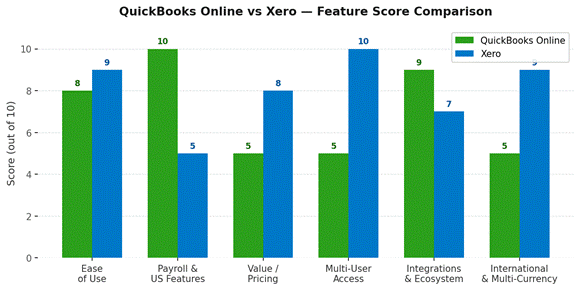
| Category | QuickBooks | Xero | Winner | Research Score |
| Ease of Use | 8 / 10 | 9 / 10 | Xero | ★ Research-based |
| Payroll & US Features | 10 / 10 | 5 / 10 | QuickBooks | ★ Research-based |
| Value / Pricing | 5 / 10 | 8 / 10 | Xero | ★ Research-based |
| Multi-User Access | 5 / 10 | 10 / 10 | Xero | ★ Research-based |
| Integrations & Ecosystem | 9 / 10 | 7 / 10 | QuickBooks | ★ Research-based |
| International & Multi-Currency | 5 / 10 | 9 / 10 | Xero | ★ Research-based |
Pros & Cons at a Glance
| ✅ QuickBooks Pros | ❌ QuickBooks Cons | ✅ Xero Pros | ❌ Xero Cons |
| Built-in payroll — best US payroll integration in category | Per-user pricing — costs rise fast with team size | Unlimited users on every plan — no per-seat cost | No built-in US payroll — requires Gusto add-on (+$40+/mo) |
| Dominant US accountant ecosystem — most CPAs know it | Significant price increases (200%+ since 2022 per users) | Cleaner, more intuitive interface (G2 ease of use: 9.0) | Entry plan (Early) capped at 20 invoices and 5 bills/mo |
| 750+ native integrations (largest in accounting) | Trustpilot score of 1.1/5 — serious customer support issues | Best multi-currency and international support | Fewer US-based accountants familiar with Xero |
| Best inventory tracking at SMB pricing | Entry plan limited to 1 user only | Free 30-day trial — no credit card required | Inventory management weaker than QuickBooks |
| Deep reporting out of the box — 80+ report templates | Weaker for international/multi-currency businesses | Stronger for global teams and non-US businesses | Bank feed disconnection issues reported by users |
| Industry-specific versions (Contractor, Retail, etc.) | No unlimited user plan at any tier | G2 rating 4.4/5 vs QuickBooks 4.0/5 | Reporting less customizable than QuickBooks out of the box |
Feature Breakdown
Ease of Use
Xero wins this category, and the G2 data is clear: ease of use score 9.0 versus QuickBooks’s 8.2. Its interface strips accounting down to its essentials — a clean dashboard showing cash position, invoices owed, bills to pay, and bank account balances at a glance. G2 reviewers repeatedly describe the dashboard as “free from unnecessary clutter” and note that bank reconciliations reduce to a few clicks. For business owners who are not accountants, Xero feels less intimidating.
QuickBooks is not difficult, but it carries more interface complexity from years of feature additions. Experienced bookkeepers tend to be faster in QuickBooks because they know where everything is. First-time users tend to find Xero more intuitive. Both platforms offer 30-day free trials — the most honest evaluation is to try both with your own data before committing.
Winner: Xero — cleaner interface and higher ease-of-use scores across every major review platform.
Payroll & US Features
QuickBooks wins this one by a wide margin for US-based businesses. Its built-in payroll integration handles federal and state tax filings, direct deposit, contractor payments, and employee benefits — all within the same platform. No separate tool, no separate subscription to manage. For a business running US payroll, this alone often justifies QuickBooks.
Xero has no native US payroll. The standard recommendation is Gusto, which integrates cleanly but adds $40 per month as a base fee plus $6 per employee per month. A 10-person company on Xero Growing ($42/month) plus Gusto ($100/month) pays $142/month all-in — more than QuickBooks Essentials with payroll at comparable coverage. Beyond payroll, QuickBooks also has a larger community of US-based ProAdvisors and CPAs who know the software deeply, which matters when you need outside help.
Winner: QuickBooks Online — built-in US payroll and the dominant US accountant ecosystem are decisive advantages.
Value / Pricing
Xero wins on pricing for most businesses — but the story is more nuanced than the entry-level numbers suggest. Xero’s Early plan at $13/month looks dramatically cheaper than QuickBooks Simple Start at $38/month, but Early caps you at just 20 invoices and 5 bills per month. Most businesses outgrow that within their first quarter. The fairer comparison is Xero Growing at $42/month versus QuickBooks Essentials at $60/month — a meaningful $18/month ($216/year) difference, with Xero including unlimited users versus QuickBooks’s limit of three.
The bigger pricing story is trajectory. Multiple QuickBooks users on G2 and Reddit report price increases of over 200% since 2022. Xero’s pricing has remained comparatively stable. For a business planning three-to-five years ahead, that pricing predictability has real financial value.
Winner: Xero — lower mid-tier pricing, unlimited users, and more stable long-term pricing trajectory.
Multi-User Access
This is Xero’s most decisive advantage. Every Xero plan — from the $13/month Early tier upward — includes unlimited users. Accountant, bookkeeper, business owner, operations manager, and CFO can all have access without adding a dollar to the monthly bill. For growing teams this is transformative: QuickBooks charges $10–$15 per additional user over the plan limit, and its entry plan only allows a single user.
QuickBooks’ per-seat model makes sense for a solo founder who will never add users. It becomes painful the moment you hire a bookkeeper, bring on a co-founder, or want your accountant to have direct access. A five-person team needing accounting access on QuickBooks Plus costs $90/month. On Xero Established it costs $78/month — with unlimited seats.
Winner: Xero — unlimited users on every plan is a category-defining advantage that compounds as teams grow.
Integrations & Ecosystem
QuickBooks wins on integration breadth. Its 750+ native integrations cover virtually every business tool category — ecommerce platforms, payment processors, POS systems, CRMs, payroll tools, inventory management, and industry-specific applications. The QuickBooks ProAdvisor network of over 600,000 certified professionals means that finding expert help, whether for implementation, tax prep, or ongoing bookkeeping, is straightforward.
Xero has around 1,000 integrations in its marketplace, but many require third-party connectors and the depth of integration varies significantly. Outside the US and UK, Xero’s ecosystem is stronger. Inside the US, QuickBooks is more deeply embedded in the professional accounting infrastructure.
Winner: QuickBooks Online for US-based businesses — 600,000+ ProAdvisors and 750+ native integrations create an unmatched ecosystem.
International & Multi-Currency
Xero is built for businesses that operate across borders. Multi-currency support is available on the Established plan, handling automatic exchange rate updates, foreign currency invoicing, and currency gains and losses reporting. Its international presence — particularly in the UK, Australia, New Zealand, and Southeast Asia — means its banking integrations and local tax compliance tools are designed with global operations in mind.
QuickBooks supports multi-currency on its Plus and Advanced plans, but the implementation is less seamless than Xero’s and international banking connections are thinner outside North America. For a business billing in multiple currencies or with operations in multiple countries, Xero is the stronger choice.
Winner: Xero — clearly the better choice for any business with international operations or multi-currency billing.
Pricing Breakdown
| Plan / Feature | QuickBooks | Xero | Better Value |
| Free Trial | 30-day free trial | 30-day free trial (no credit card) | Xero |
| Entry Plan | $38/mo — Simple Start (1 user only) | $13/mo — Early (20 invoices, 5 bills/mo) | Xero |
| Mid Tier | $60/mo — Essentials (3 users) | $42/mo — Growing (unlimited users) | Xero |
| Top Tier | $90/mo — Plus (5 users) | $78/mo — Established (unlimited users) | Xero |
| Advanced / Premium | $200/mo — Advanced (25 users) | No equivalent tier | QuickBooks |
| Payroll (US) | Built-in — $45+/mo add-on | Requires Gusto: $40+/mo + $6/employee | QuickBooks |
| Extra Users | $10–$15/user/mo over plan limit | Unlimited on all plans — no add-on cost | Xero |
| Multi-Currency | Plus plan and above only | Included in Established plan | Xero |
| Price Trajectory | Raised prices 200%+ since 2022 (user reports) | Stable pricing — no major increases reported | Xero |
Critical watch-out for QuickBooks: the per-user pricing model inflates costs significantly as teams grow. A five-person team needing accounting access costs $90/month on QuickBooks Plus — versus $78/month on Xero Established with unlimited users. Also factor in the 200%+ price increase trajectory reported by long-term QuickBooks users when evaluating three-year total cost.
What Real Users Are Saying
QuickBooks Online — G2 & Capterra
“QuickBooks Online excels in its payroll functionality, making it particularly user-friendly for small businesses. Users appreciate the ease of running payroll, even for a single employee, and the ability to access data in real time, which enhances collaboration with clients.”
— G2 AI-generated summary from verified QuickBooks Online reviews, 2026
“The most common complaints in 1–3 star reviews include repeated price increases — several users report 200%+ increases since 2022 — long customer support hold times, unauthorized charges after cancellation, and features locked behind higher-tier plans. The QuickBooks Trustpilot score of 1.1/5 reflects these service issues.”
— Plutio platform comparison citing Trustpilot and G2 negative reviews, February 2026
Xero — G2 & Capterra
“Xero’s dashboard offers an instant overview of billing information and operational costs, which many find invaluable for maintaining a smooth flow of commercial activities. The interface is free from unnecessary clutter — automated bank reconciliations reduce to just a few clicks.”
— G2 AI-generated summary from verified Xero reviews, 2026
“Xero’s pricing can be steep for small businesses at higher tiers, and its reporting features lack customization compared to QuickBooks. Users also note issues with bank integration, citing frequent disconnections as a frustration.”
— Capterra reviewer consensus, Xero, April 2026
Reddit’s Perspective
“Most teams based outside the US tend to use Xero, while the US seems to favor QuickBooks Online — although Xero is a leader in the accounting space even within the US. If you ever plan to scale internationally, start on Xero. Migrating accounting systems later is a nightmare.”
— Efficient.app editorial team, citing community feedback, May 2026
Who Should Choose Which
Go with QuickBooks Online if…
- You are a US-based business that needs payroll handled natively — no extra tools
- Your accountant or bookkeeper already knows QuickBooks (the overwhelming majority of US CPAs do)
- You need deep, out-of-the-box reporting with 80+ templates and industry-specific insights
- Your business has complex inventory management needs at SMB pricing
- You are a solo founder or very small team where per-user pricing does not matter yet
- You need an industry-specific version (Contractor, Retail, Self-Employed)
Go with Xero if…
- You have a growing team where multiple people need accounting access — unlimited users saves real money
- You operate internationally or bill in multiple currencies
- Pricing stability matters — you are concerned about QuickBooks’ history of aggressive price increases
- You are based outside the US (UK, Australia, New Zealand, Southeast Asia) where Xero has deeper local support
- You want a cleaner, more intuitive interface that non-accountants can navigate independently
- You do not need built-in payroll — or are comfortable adding Gusto separately
Go with neither if…
- You are a freelancer or solo consultant with very basic invoicing needs — Wave Accounting is free and handles invoicing, bank connections, and basic reporting with no monthly cost. FreshBooks is purpose-built for service businesses billing by the hour and starts at $6.30/month.
Final Verdict
QuickBooks is the right choice for most US businesses. Xero is the right choice for growing teams, international operators, and anyone who has watched their QuickBooks bill climb for three years running.
For a US-based small business with employees, a local CPA, and no plans to operate internationally — QuickBooks Online is the safer choice. The built-in payroll, the 600,000-strong ProAdvisor network, and the sheer ubiquity of QuickBooks in the US accounting ecosystem create switching costs that make the platform’s pricing aggression and support issues worth tolerating for most.
For any business adding its third or fourth person who needs accounting access, operating across currencies, or paying close attention to a software budget that keeps getting revised upward — Xero is the more financially rational choice. Its G2 rating is higher, its ease-of-use score is higher, its pricing model is more predictable, and its international capabilities are superior. The only genuine gap is US payroll, and Gusto fills that cleanly.
The single most important thing to do before deciding: start a free trial of both with your actual bank account connected. Both offer 30-day trials. The platform that makes your real data look clear and manageable is the right one for you — no comparison article can simulate that.

Research note: Scores and analysis based on G2 user reviews (5,000+ combined), Capterra, Trustpilot, NerdWallet, Efficient App, and independent analyst comparisons. Pricing verified May 2026 from official QuickBooks and Xero pricing pages. G2 ratings: QuickBooks Online 4.0/5 (3,674 reviews), Xero 4.4/5 (1,560 reviews). This post may contain affiliate links.
Next Steps to Gear It Up!
If you’re serious about building your business online, with Content, Leads and Payment collection, these 3 tools matter most. Here’s how to choose the Best Ones…